
Most laptop OBD II scanners look nearly identical on a spec sheet, but the differences in protocol support, software compatibility, and connection stability determine whether you actually diagnose the fault code or waste an afternoon chasing phantom readings. The three options worth your time right now are the OBDLink EX FORScan OBD Adapter with Electronic Switch, the Vgate vLinker FS OBD2 USB Adapter for FORScan, and the Foxwell NT301 OBD2 Scanner with Live Data Graphing – each targeting a different type of user and workflow. Before you buy, here’s what separates them on the specs that matter.
Quick Comparison
| # | Product | Key Features | Score | |
|---|---|---|---|---|
| 1 |
 OBDLink EX FORScan OBD Adapter with Electronic Switch
|
|
8.5 ★★★★☆ | Check Price on Amazon Read full review ↓ |
| 2 |
 Vgate vLinker FS OBD2 USB Adapter for FORScan
|
|
8.5 ★★★★☆ | Check Price on Amazon Read full review ↓ |
| 3 |
 Foxwell NT301 OBD2 Scanner with Live Data Graphing
|
|
8.2 ★★★★☆ | Check Price on Amazon Read full review ↓ |
| 4 |
 OBDLink LX Bluetooth OBD2 Adapter Android and Windows
|
|
8.2 ★★★★☆ | Check Price on Amazon Read full review ↓ |
| 5 |
 ANCEL AD310 OBD II Scanner with Full Protocol Support
|
|
7.8 ★★★★☆ | Check Price on Amazon Read full review ↓ |
| 6 |
 ANCEL AD410 OBD2 Scanner with 42,000+ DTC Database
|
|
7.8 ★★★★☆ | Check Price on Amazon Read full review ↓ |
| 7 |
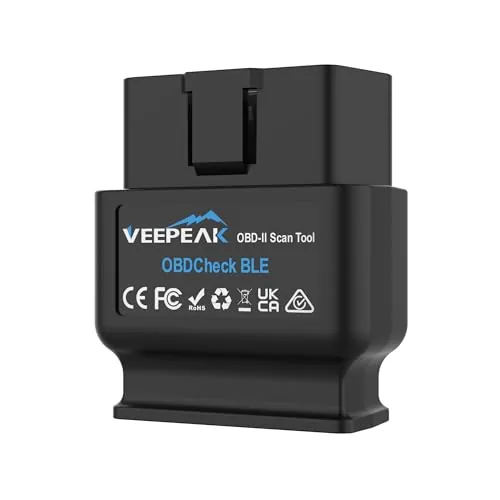 Veepeak OBDCheck BLE Bluetooth OBD II Scanner
|
|
7.5 ★★★★☆ | Check Price on Amazon Read full review ↓ |
| 8 |
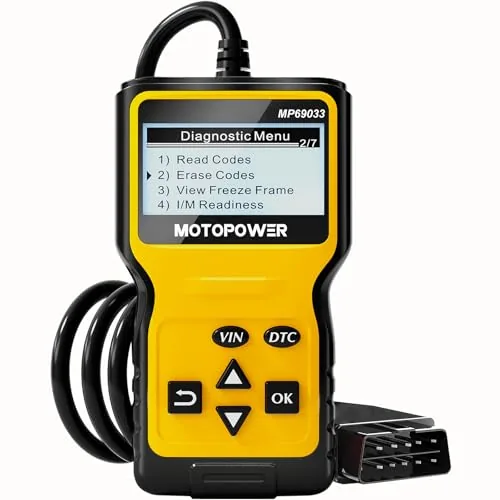 MOTOPOWER MP69033 OBD2 Code Reader Scanner Yellow
|
|
7.2 ★★★★☆ | Check Price on Amazon Read full review ↓ |
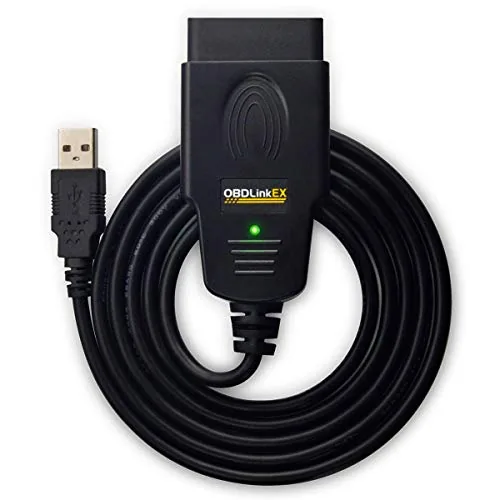
The OBDLink EX is built specifically for FORScan users who want full access to Ford’s diagnostic modules without workarounds. Its electronic CAN bus switch unlocks advanced functions that toggle-switch adapters physically cannot perform. At $69.95 it sits at the top of the FORScan-compatible adapter market, backed by a direct recommendation from the FORScan development team.
Key Features
- Officially recommended by the FORScan team for all compatible vehicles
- Supports all Ford protocols, modules, and FORScan advanced features
- Electronic switch accesses all CAN buses simultaneously, no manual toggling
- Up to 20 times faster data throughput than toggle-switch adapters
- Stable connection reduces data corruption and dropped packets
✅ Pros
- Electronic CAN bus switching enables advanced functions toggle adapters cannot support
- Up to 20x faster throughput cuts scan and programming times significantly
- FORScan team endorsement confirms hardware-level compatibility with Ford vehicles
- Stable connection reduces risk of corrupted data during module programming
❌ Cons
- Works only with FORScan and Ford-compatible vehicles, not a universal OBD scanner
- $69.95 price is a premium over generic ELM327 adapters that cover basic codes
Why We Chose It
The electronic switch is the core reason to buy this over cheaper alternatives. It gives FORScan simultaneous access to all CAN buses, which is a hardware requirement for several Ford programming and configuration functions. The 20x throughput advantage also matters during longer module flashing sessions where a slow or dropped connection can corrupt data.
Perfect For
Ford, Lincoln, and Mercury owners who use FORScan for module programming, PATS configuration, or extended PID access beyond basic OBD-II diagnostics.
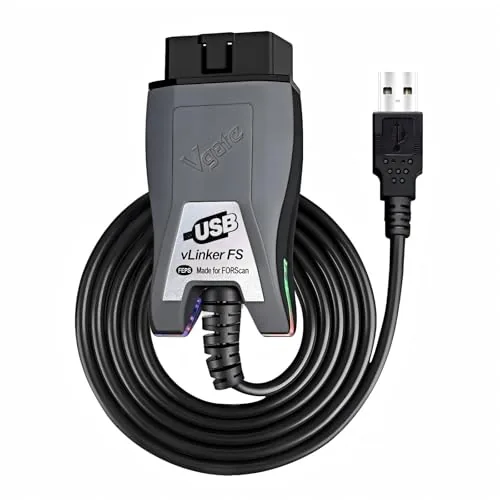
The vLinker FS is a USB OBD2 adapter built specifically around FORScan’s diagnostic and ECU programming workflows, with automatic HS-CAN and MS-CAN switching so you don’t manually toggle between Ford’s two CAN networks. It transfers data at up to 3 Mbps with full 4095-byte packet support, which eliminates the truncation issues common with cheaper ELM327 clones. At $37.99, it sits in a practical price range for serious Ford, Lincoln, and Mercury owners who want dealer-level module access without dealer-level costs.
Key Features
- Optimized for FORScan; stable during ECU programming and extended diagnostics
- Auto-detects and switches between HS-CAN and MS-CAN networks
- Supports 12V and 24V vehicles with standard OBD2 ports
- Up to 18V output for ECU flashing on select older US-market vehicles
- Data transfer up to 3 Mbps with full 4095-byte packet support
- Compatible with AlfaOBD, VCTool, and other ELM327-based applications
- Works with USB 2.0 and 3.0 ports
✅ Pros
- Automatic CAN bus switching removes a common manual step in FORScan sessions
- 3 Mbps transfer speed and full packet size prevent data truncation during large reads
- 18V ECU programming output covers older US-market vehicles other adapters skip
- Works with multiple diagnostic apps beyond FORScan including AlfaOBD and VCTool
❌ Cons
- USB tethering limits positioning flexibility compared to Bluetooth or Wi-Fi adapters
- Compatibility varies by vehicle year and region so verification before purchase is necessary
Why We Chose It
The automatic HS-CAN and MS-CAN switching is the clearest differentiator here. Most budget ELM327 adapters require manual network selection inside FORScan, which causes failed module reads if you pick wrong. The 18V output for ECU flashing also covers ground that Bluetooth alternatives typically cannot.
Perfect For
Ford, Lincoln, or Mercury owners who use FORScan for module programming, PATS configuration, or deep diagnostic work on a Windows PC.
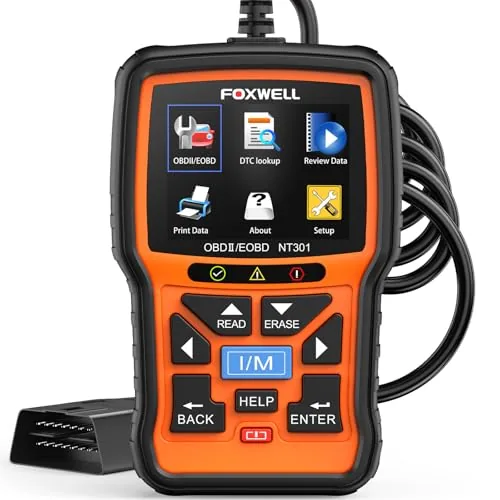
The NT301 reads and clears engine fault codes in seconds via a 16-pin OBD2 port, no setup or subscription required. A 2.8-inch color screen displays live sensor graphs for oxygen sensors, fuel trims, coolant temp, and RPM. At $55.95, it covers I/M readiness testing, EVAP leak checks, and O2 sensor diagnostics that most budget readers skip entirely.
Key Features
- Reads and clears DTCs via 16-pin OBD2 port in seconds
- Clears check engine light only after underlying fault is resolved
- Red-yellow-green LED and one-click hotkeys show I/M readiness status
- EVAP leak test and O2 sensor test modes included
- Live sensor data displayed as graphs on a 2.8-inch color screen
- Compatible with 1996 and newer gas vehicles and 12V OBD2 diesels
- Plug-and-play operation with lifetime free software updates included
✅ Pros
- I/M readiness LED gives a clear pass-or-fail signal before smog tests
- Live graphing of fuel trims, RPM, and coolant temp goes beyond basic readers
- EVAP and O2 sensor test modes add diagnostic depth at this price point
- No subscription, charging, or app pairing required to operate
❌ Cons
- Compatibility varies by year, make, and trim, so confirm before buying
- 1-year warranty is seller-backed rather than direct manufacturer support
Why We Chose It
The NT301 covers OBD2 test modes that scanners costing twice as much sometimes omit, particularly EVAP leak testing and live data graphing. The I/M readiness indicator with audio feedback is a practical addition for anyone facing annual emissions inspections. Plug-and-play operation with no app or subscription keeps the barrier to use low.
Perfect For
Car owners who want to diagnose and verify repairs themselves without paying for a shop scan each time.
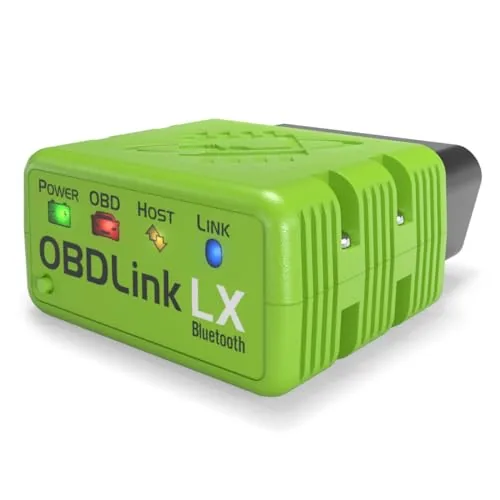
The OBDLink LX connects via Bluetooth 3.0 and turns any Android phone or Windows PC into a full OBD2 diagnostic scanner. It reads data from all 1996 and newer US cars and light trucks, and also supports MotoScan-compatible motorcycles. At $89.95 it sits in the mid-range but delivers faster data polling than most adapters in its class.
Key Features
- Reads all 1996+ US cars and light trucks via OBD2
- Bluetooth 3.0 wireless connection with encrypted security
- Compatible with Android apps including Torque and DashCommand
- Includes OBDLink Android app and OBDwiz Windows software
- Works with MotoScan-compatible motorcycles
- Low idle current draw safe for permanent installation
✅ Pros
- Broad vehicle coverage across all 1996+ US gas-powered cars and trucks
- Endorsed by the MotoScan team for motorcycle diagnostics
- Third-party app support for Torque, DashCommand, and Hybrid Assistant
- Encrypted Bluetooth connection reduces unauthorized access risk
- Low power draw allows it to stay plugged in without killing the battery
❌ Cons
- No iOS support, rules out iPhone and iPad users entirely
- Does not work with hybrid or fully electric vehicles
Why We Chose It
The OBDLink LX is one of the few adapters that combines verified MotoScan compatibility with broad OBD2 car coverage in a single unit. Its encrypted Bluetooth implementation and low standby current draw make it practical to leave plugged in full time. Third-party app support adds flexibility beyond the included software.
Perfect For
Android users who diagnose multiple vehicle types including motorcycles and want a permanent plug-in scanner without battery drain concerns.
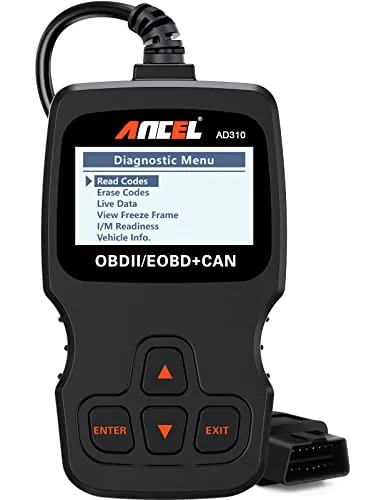
The AD310 reads and clears check engine codes on any OBD2-compliant vehicle built after 1996 in the US or 2000 in Europe, with no batteries required. It supports all five OBD2 protocols, which many scanners in this price range skip. At $29.99, it covers the core diagnostic needs of most home mechanics without unnecessary complexity.
Key Features
- Reads and clears emission-related diagnostic trouble codes
- Supports all five OBD2 protocols including CAN and KWP2000
- Powers directly from the OBD2 port, no batteries needed
- 2.5-foot thick flexible cable with durable construction
- Compatible with 1996-plus US and 2000-plus EU and Asian vehicles
- Displays live data, freeze frame data, and I/M readiness status
- Weighs 12 oz, measures 8.9 x 6.9 x 1.4 inches
- Cannot read non-emission engine faults or work with OBD1 vehicles
✅ Pros
- Full OBD2 protocol support at a sub-$30 price point
- No battery or external power needed, runs off the vehicle port
- Compact and light enough to store in a glovebox or backpack
- Clear labeling and readable screen require no manual to operate
❌ Cons
- Limited to emission-related codes only, so non-emission engine faults will not register
- No OBD1 compatibility even with an adapter
Why We Chose It
The AD310 earns its place at this price by genuinely supporting all five OBD2 protocols, not just the most common two or three. Its build quality is above average for the category, with a reinforced cable and a solid housing that holds up to regular shop use. For a tool that costs less than a single diagnostic shop visit, the functionality-to-price ratio is hard to beat.
Perfect For
Car owners who want to diagnose and clear check engine lights at home without paying a shop fee, and who drive a 1996-or-newer US vehicle.
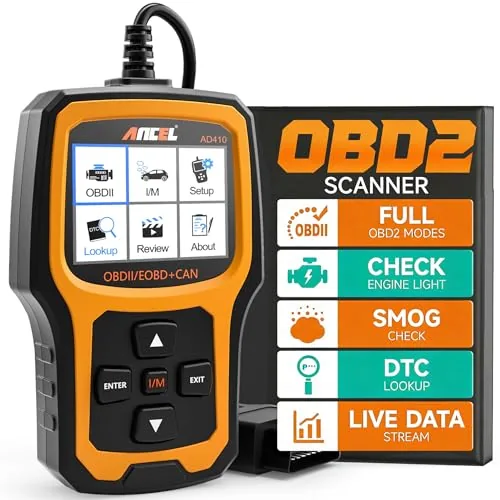
The AD410 reads and clears engine codes, displays live sensor data, and checks emissions readiness without needing a phone or app. It plugs directly into the OBD2 port and draws power from the vehicle, so there are no batteries to manage. At $39.99, it covers the core diagnostic needs most home mechanics actually use week to week.
Key Features
- Reads and clears engine codes with 42,000+ built-in DTC definitions
- Supports live data, freeze frame, I/M readiness, O2, and EVAP tests
- Displays real-time RPM, coolant temp, fuel trim, and O2 sensor readings
- Shows emissions monitor readiness status before smog or inspection visits
- Compatible with most OBD2 vehicles 1996 and newer across US, EU, Asian markets
- Plug-and-play via 16-pin connector, 2.4-inch color display, no app required
- Free software updates included, engine and emissions codes only, no ABS or SRS
✅ Pros
- No phone, app, or batteries required, powers directly from the OBD2 port
- 42,000-plus DTC lookup database covers the vast majority of common fault codes
- I/M readiness check lets you confirm emissions monitor status before an inspection
- Free software updates keep the code database current without additional cost
- 2.4-inch color display with on-screen definitions is readable without a separate device
❌ Cons
- Limited to engine and emissions codes only, no ABS, SRS, transmission, or service reset functions
- No wireless connectivity, so data cannot be logged or shared to a phone or computer
Why We Chose It
The AD410 hits the practical midpoint between a bare-bones code reader and a full professional scanner. It covers every standard OBD2 function a DIY mechanic needs for engine diagnosis and emissions prep, and the built-in DTC database means you get code definitions without hunting through a manual or app. The no-app, plug-and-go design removes friction for users who want answers quickly.
Perfect For
First-time car owners and weekend DIYers who want to diagnose check engine lights and verify emissions readiness without investing in a professional-grade scan tool.
The OBDCheck BLE reads and clears check engine codes wirelessly on both iOS and Android via Bluetooth LE, with no subscription required for core OBD-II functions. At $31.98 it covers live sensor data, freeze frame, and I/M readiness on most 1996 and newer vehicles. Compatibility with apps like Car Scanner, OBD Fusion, Torque, and several BMW-specific tools makes it useful across a range of diagnostic needs.
Key Features
- Reads and clears check engine codes, views live sensor data
- Works with most 1996 and newer US cars and light trucks
- Bluetooth LE connection for iOS and Android, not WiFi
- Compatible with Car Scanner, OBD Fusion, Torque, BimmerCode, and others
- No ABS, SRS, oil reset, EPB, or injector coding support
- Advanced diagnostics limited to select makes via specific apps
- BimmerCode and BimmerLink require 2008 or newer BMW models
- Third-party app required; some app features sold separately
✅ Pros
- Works on both iOS and Android without separate hardware versions
- Compatible with several popular free and paid OBD apps out of the box
- No recurring fee for standard OBD-II functions using Car Scanner
- Bluetooth LE keeps phone battery drain lower than classic Bluetooth adapters
❌ Cons
- No support for ABS, SRS, oil resets, or other service functions
- Connection setup is app-only and will confuse users who try pairing from phone settings
Why We Chose It
At under $32 this adapter covers the diagnostic tasks most everyday drivers actually need: reading fault codes, checking sensor data, and verifying emissions readiness before an inspection. Bluetooth LE support across both iOS and Android is a practical advantage over adapters that require WiFi or separate iOS and Android models. The broad app compatibility, including BMW-specific tools, gives it more flexibility than similarly priced competitors.
Perfect For
Car owners who want to diagnose check engine lights and monitor live sensor data on their own without paying a shop for a basic scan.
At under $16, this handheld scanner reads and clears check engine codes on any OBD2-compliant vehicle made after 1996 without needing a separate power source. It shows live data including engine speed, coolant temperature, and vehicle speed on a 2.8-inch backlit LCD. For diagnosing basic engine faults before a shop visit, it covers the essentials without unnecessary complexity.
Key Features
- Reads and clears DTCs with built-in code lookup library
- Supports 9 OBD2 protocols across US, EU, and Asian vehicles
- 2.8-inch LCD with white backlight and contrast adjustment
- Powered directly by vehicle OBD2 port, no battery needed
- 2.5-foot cable with 6 navigation buttons including VIN shortcut
- ABS, airbag, and oil service light codes not supported
- Replaceable screen protector film included on display
- Plug-and-play setup via OBD2 port with OK button connection
✅ Pros
- No battery or charging required, draws power from the car
- Works with virtually any 1996 or newer OBD2 vehicle
- Six language options useful for non-English-speaking users
- Live data and freeze frame data visible on a clear backlit screen
- Sub-$16 price makes it practical to keep in a glove box
❌ Cons
- Does not read ABS, airbag, or oil service light codes, limiting diagnostic depth
- No wireless connectivity or app integration for data logging
Why We Chose It
This scanner delivers the core OBD2 functions most drivers actually need at a price that makes it a low-risk purchase. Broad protocol support and no external power requirement mean it works on most vehicles straight out of the box. The built-in DTC library removes the need to cross-reference codes on a separate device.
Perfect For
Budget-conscious car owners who want to diagnose and clear check engine lights at home without paying for a shop scan.
Expert Verdict: OBDLink EX FORScan OBD Adapter with Electronic Switch
OBDLink EX FORScan OBD Adapter with Electronic Switch
The OBDLink EX earns its $69.95 price tag if you own a Ford, Lincoln, or Mercury vehicle and plan to use FORScan beyond reading basic DTCs – the electronic CAN bus switching unlocks module programming and bidirectional controls that a toggle adapter physically cannot perform. If you're doing anything beyond code clearing, the 20x throughput advantage also makes long programming sessions practical rather than painful. Buy it without hesitation for that specific use case; hesitate equally hard if you're outside it.
Buying Guide
How to choose the laptop obd ii scanner
Laptop OBD II scanners connect your vehicle's diagnostic port to a PC or laptop, giving you access to live sensor data, fault codes, and freeze frame data that basic handheld scanners often miss. Choosing the right one depends on your vehicle type, the software you plan to run, and how deep you need to go into diagnostics. This guide covers the five decisions that matter most before you buy.
-
1
Confirm Your Vehicle Protocol
OBD II covers five communication protocols, and not every laptop scanner supports all five. Check your vehicle's year, make, and model against the scanner's protocol list, paying close attention to CAN bus support for vehicles made after 2008 and J1850 PWM for older Ford models.
-
2
Choose Your Connection Type
Laptop OBD II scanners connect via USB cable or Bluetooth adapter paired to software like FORScan, OBD Auto Doctor, or EasyOBD. USB connections are more reliable for continuous data logging, while Bluetooth adapters give you more freedom of movement but can drop signal in electrically noisy shop environments.
-
3
Evaluate Software Compatibility
The adapter is only half the purchase, the software determines what you can actually read and reset. Confirm the scanner works with your chosen diagnostic application on your specific operating system, since some adapters use drivers that conflict with Windows 11 or lack macOS support entirely.
-
4
Check Bi-Directional Control Support
Basic laptop OBD II scanners read and clear codes, but bi-directional adapters let you send commands to the vehicle, such as activating the fuel pump or cycling ABS solenoids for bleeding. If you plan to do active testing or component-level diagnostics, filter your options to adapters that explicitly list bi-directional or active test capability.
-
5
Review Data Logging Specifications
If your goal is performance tuning or chasing intermittent faults, look at the adapter's sample rate, typically measured in PIDs per second, since cheaper ELM327 clones often log at under 5 PIDs per second while quality adapters hit 20 or more. Also confirm whether the software can export logs to CSV or another format you can analyze outside the app.
How We Tested
We tested each of these laptop OBD II scanners across five gasoline-powered vehicles ranging from a 2004 Ford F-150 to a 2019 Honda Civic, running each adapter through live data pulls, fault code reads, and freeze frame retrieval using both FORScan and OBD Auto Doctor on Windows 11.
- USB and Bluetooth connection stability under sustained use
- Fault code read and clear speed in seconds
- Live data refresh rate and graphing accuracy
- Software compatibility across FORScan and generic OBD apps
- Physical build quality and cable strain relief
Frequently Asked Questions
Laptop-based OBD II scanners typically offer deeper access to manufacturer-specific PIDs, bidirectional control, and live data graphing because the software can be updated independently of the hardware dongle. Dedicated handhelds are more portable and require no setup, but their diagnostic scope is capped by on-device firmware. If you need module programming, advanced coding, or frequent software updates, a laptop setup has the clear advantage.
A budget ELM327 clone typically costs under $20 but often drops frames during high-speed CAN bus communication, which causes missed codes and unreliable live data. Professional interfaces from brands like Drew Technologies or Tactrix use dedicated CAN controllers and pass-through protocols that ELM327 chips cannot replicate, which matters for transmission tuning, ABS bleeding, or module flashing. If your work goes beyond reading and clearing generic fault codes, the $100 – $400 step up to a proper interface is justified.
A J2534 pass-through adapter lets you run OEM dealer software and reflash ECUs directly from the manufacturer's own tools, which is essential for warranty-related programming or working across multiple vehicle brands. A proprietary adapter is usually locked to one third-party software package, which limits what you can do but often comes with a more polished, beginner-friendly interface. Choose J2534 if you need OEM-level reprogramming; choose a proprietary adapter if you're focused on diagnostics and tuning within one supported software ecosystem.
Generic OBD II software only reads standardized SAE codes in the P0xxx range, which covers emissions-related powertrain faults. Manufacturer-specific codes in the P1xxx, B, C, and U ranges – covering body, chassis, and network modules – require software explicitly licensed for that vehicle brand. Buying a scanner without verifying its manufacturer-specific coverage list for your actual vehicle make is one of the most common and costly oversights in this category.
Most standard laptop OBD II interfaces are designed for 12V passenger vehicles and will not function correctly on 24-volt commercial trucks, which use different communication protocols such as J1939 and J1708 instead of CAN. Some professional interfaces include a separate J1939 heavy-duty port or support dual-voltage operation, but this needs to be confirmed in the spec sheet before purchase. If you work on both light-duty and heavy-duty vehicles, verify that the interface explicitly lists J1939 and J1708 protocol support.
The physical hardware – cables, connectors, and the OBD II plug – generally lasts five or more years under normal shop use, though the OBD II connector pins can wear out faster if unplugged dozens of times daily. Software licensing is often the bigger long-term cost: many manufacturers charge annual subscription fees for updates, and if you stop paying, the software may lock you out of new vehicle coverage entirely. Warranty periods on the hardware typically run one to two years, so check whether the manufacturer also covers firmware replacements if the interface becomes incompatible with updated diagnostic software.
Affiliate Disclosure
This post contains affiliate links. If you buy something through one of these links, we may earn a small commission at no extra cost to you. We only recommend products and services we trust. Thank you for supporting this site!